
Home › Start Here
Start Here: AI automation for beginners
Ten minutes, no jargon. By the end you'll know every word our guides use.
What is an automation?
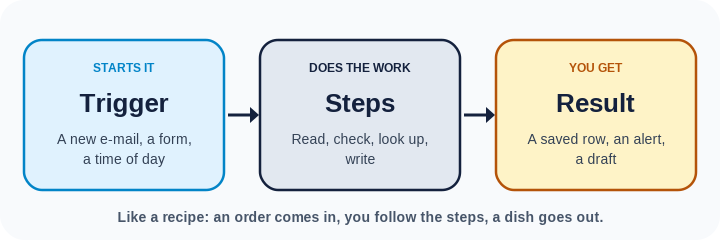
An automation is a recipe a computer follows by itself. When an order comes in (the trigger), the kitchen follows the steps, and a dish goes out (the result). Automations do the same with messages, spreadsheets and e-mail.
Where does AI fit in?
Ordinary automations are great with tidy information, like a number in a form. They struggle with how people really write: "hey, any chance you're open Sunday?" AI (in our templates, Claude from Anthropic) is good at reading messages like that and writing short replies.
What is n8n?
n8n (say "n-eight-n") is the program that runs your automations. You build an automation by connecting boxes on a screen, no programming needed, or by importing one of our ready-made templates. You can use it as n8n Cloud (a website you sign in to, where n8n keeps everything running) or install it yourself for free on your own computer or server.
The words you'll see in our guides
- Workflow
- n8n's word for one automation. Like one recipe card.
- Node (we say "step")
- One box in a workflow that does one job, for example "read the Google Sheet". One line of the recipe.
- Trigger
- The first step: what starts the workflow. A new e-mail, a form being sent, or a time of day. The doorbell.
- Webhook
- A trigger with its own private web address. Whatever your website sends to that address starts the workflow. A mailbox with your workflow's name on it.
- Integration
- A ready-made connection to another service, like Gmail or Google Sheets. An adapter plug.
- Credential
- The saved permission that lets n8n use one of your accounts. You create it once, inside n8n, and n8n stores it encrypted. A spare key you give to a trusted helper. You can take it back any time.
- API key
- A long secret password that lets one program use another, for example n8n using Claude. Keep it private, like a bank PIN.
- Execution (we say "run")
- One time the workflow ran from start to finish. n8n Cloud plans include a number of runs per month.
- Publish
- Switching a workflow on so it runs by itself. Before that, it only runs when you test it.
- JSON
- A plain-text format programs use to save information. Our template files are JSON. You never need to edit them by hand.
- Template
- A ready-made workflow file you import into n8n and then connect to your own accounts.
Your first automation, in five steps
- Pick a guide: e-mail drafts is a gentle first choice.
- Make a free n8n Cloud account (or sign in to your own n8n).
- Download the template and import it.
- Connect your accounts. Each guide shows every click.
- Test with made-up customers, then click Publish.